Changes › MC1218712

(Updated) Microsoft Teams: Meeting notes now available for instant meetings

Microsoft Teams Stay informed
Published
16 Jan 2026
Last modified
11 Aug 2026 17:45 UTC
Act by
Ends
05 Oct 2026
First archived
25 Aug 2026
Revisions
40
Summary
Microsoft Teams now supports meeting notes for instant meetings via Loop components, enabling collaborative agendas, notes, and task creation synced with Planner and To Do. Rollout occurs April–August 2026 across environments. Notes appear in a pane, accessible post-meeting in Recap, with default company shareable links. No admin action required.
Platforms
Desktop, Mac, Web
RoadmapIds
541831
FeatureStatusJson
{"0":[{"RoadmapId":0,"McPostId":"MC1218712","Platform":"Desktop","Status":"FeatureRolloutStatusNotSupported","LastUpdateTime":"2026-09-03T18:00:31.7151382Z","LatestRing":null,"TenantRolloutRing":null},{"RoadmapId":0,"McPostId":"MC1218712","Platform":"Mac","Status":"FeatureRolloutStatusNotSupported","LastUpdateTime":"2026-09-03T18:00:31.7151383Z","LatestRing":null,"TenantRolloutRing":null},{"RoadmapId":0,"McPostId":"MC1218712","Platform":"All","Status":"FeatureRolloutStatusNotSupported","LastUpdateTime":"2026-09-03T18:00:31.7151384Z","LatestRing":null,"TenantRolloutRing":null}]}
Tags
Updated messageNew featureUser impact

Full post

Updated August 11, 2026: We have updated the timeline. Thank you for your patience. 

[Introduction]

Teams meeting Notes, powered by Loop, are now available for instant calls and meetings, like those started from Meet now and calls started from chat. Meeting notes are Loop components in Teams meetings and chats that allow users to collaboratively build agendas, capture notes, and create action items. Once added, they stay in sync and can be shared and edited in the Loop app in your web browser.

This message applies to Teams for Windows desktop, Teams for Mac desktop, and Teams for the web and is associated with Microsoft 365 Roadmap ID 541831.

[When this will happen:]

  • Targeted Release: We will begin rollout early April 2026 (previously mid-March) and expect to complete mid-April 2026 (previously late March).
  • General Availability (Worldwide): We will begin rollout mid-April 2026 (previously early April) and expect to complete mid-May 2026 (previously late April).
  • General Availability (GCC): We will begin rollout mid-May 2026 (previously late April) and expect to complete late May 2026.
  • General Availability (GCC High): We will begin rollout early June 2026 (previously late May) and expect to complete mid-June 2026 (previously mid-June).
  • General Availability (DoD): We will begin rollout mid-July 2026 (previously early June) and expect to complete by end of August 2026 (previously early August).

[How this affects your organization:]

Who is affected:

  • All users who participate in instant meetings in Microsoft Teams.
  • Admins managing Teams, SharePoint sharing defaults, or Loop settings.

What will happen:

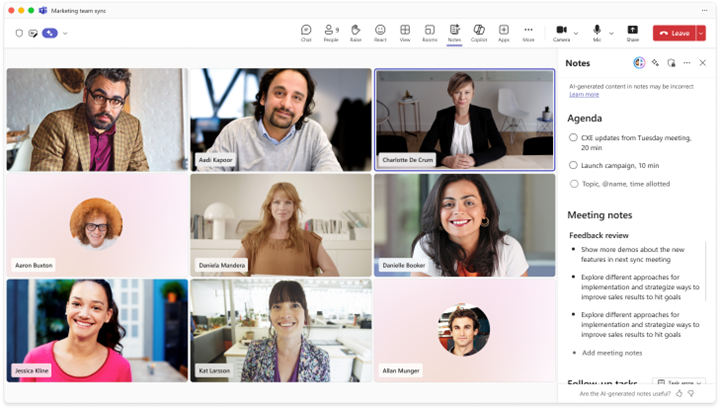
  • Users can add meeting notes using the Notes button in meeting controls.
  • Notes appear in a right-side pane with an option to open in the browser.
  • user settings

  • Notes are Loop components and stay in sync across Teams and the Loop app.
  • Users can co-create agendas, take notes, and assign tasks.
  • Tasks sync with Planner and To Do and send email notifications.
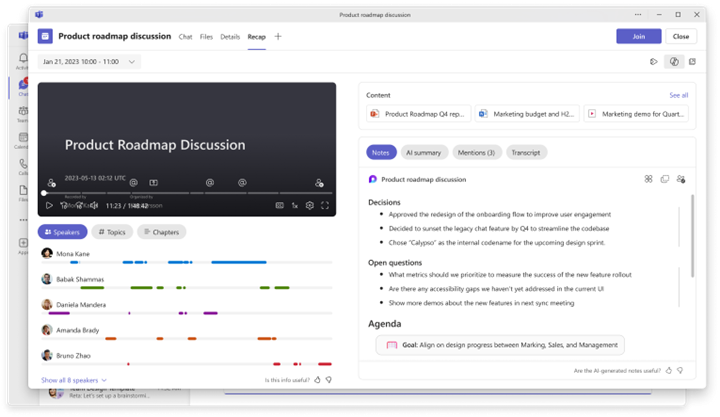
  • After the meeting, notes are accessible in the Recap tab → Notes.
  • user settings

  • Note: The new meeting notes file will generate a Company Shareable Link (CSL) unless your organization has set People Specific Link (PSL) as the default. If PSL is the default, only users included on the original meeting invite will be able to access the notes. Users who were forwarded the meeting or nudged into it will need to request access to the notes.
  • This feature is enabled by default.
  • Known limitation: Meeting notes are not available for Teams calls.
[What you can do to prepare:]

No admin action is required.

  • Review your organization’s SharePoint sharing defaults.
  • Notify users or helpdesk staff about this change.
  • Update internal documentation as needed.
  • Manage this feature via PowerShell if necessary:
    Set-SPOTenant -IsCollabMeetingNotesFluidEnabled (boolean)

Learn more: Settings management for Loop functionality in Teams

[Compliance considerations:]

No compliance considerations identified, review as appropriate for your organization.

Commands mentioned in this post

  • Set-SPOTenant Sets properties on the SharePoint Online organization.

Roadmap features referenced by this post

Revision history

  1. 25 Aug 2026 07:01 UTC — Microsoft's lastModified 11 Aug 2026 17:45 UTC
  2. 25 Aug 2026 12:00 UTC — Microsoft's lastModified 11 Aug 2026 17:45 UTC
  3. 25 Aug 2026 18:00 UTC — Microsoft's lastModified 11 Aug 2026 17:45 UTC
  4. 26 Aug 2026 00:00 UTC — Microsoft's lastModified 11 Aug 2026 17:45 UTC
  5. 26 Aug 2026 06:00 UTC — Microsoft's lastModified 11 Aug 2026 17:45 UTC
  6. 26 Aug 2026 12:00 UTC — Microsoft's lastModified 11 Aug 2026 17:45 UTC
  7. 26 Aug 2026 18:00 UTC — Microsoft's lastModified 11 Aug 2026 17:45 UTC
  8. 27 Aug 2026 00:00 UTC — Microsoft's lastModified 11 Aug 2026 17:45 UTC
  9. 27 Aug 2026 06:00 UTC — Microsoft's lastModified 11 Aug 2026 17:45 UTC
  10. 27 Aug 2026 12:00 UTC — Microsoft's lastModified 11 Aug 2026 17:45 UTC
  11. 27 Aug 2026 18:00 UTC — Microsoft's lastModified 11 Aug 2026 17:45 UTC
  12. 28 Aug 2026 00:00 UTC — Microsoft's lastModified 11 Aug 2026 17:45 UTC
  13. 28 Aug 2026 06:00 UTC — Microsoft's lastModified 11 Aug 2026 17:45 UTC
  14. 28 Aug 2026 12:00 UTC — Microsoft's lastModified 11 Aug 2026 17:45 UTC
  15. 28 Aug 2026 18:00 UTC — Microsoft's lastModified 11 Aug 2026 17:45 UTC
  16. 29 Aug 2026 00:00 UTC — Microsoft's lastModified 11 Aug 2026 17:45 UTC
  17. 29 Aug 2026 06:00 UTC — Microsoft's lastModified 11 Aug 2026 17:45 UTC
  18. 29 Aug 2026 12:00 UTC — Microsoft's lastModified 11 Aug 2026 17:45 UTC
  19. 29 Aug 2026 18:00 UTC — Microsoft's lastModified 11 Aug 2026 17:45 UTC
  20. 30 Aug 2026 00:00 UTC — Microsoft's lastModified 11 Aug 2026 17:45 UTC
  21. 30 Aug 2026 06:00 UTC — Microsoft's lastModified 11 Aug 2026 17:45 UTC
  22. 30 Aug 2026 12:00 UTC — Microsoft's lastModified 11 Aug 2026 17:45 UTC
  23. 30 Aug 2026 18:00 UTC — Microsoft's lastModified 11 Aug 2026 17:45 UTC
  24. 31 Aug 2026 00:00 UTC — Microsoft's lastModified 11 Aug 2026 17:45 UTC
  25. 31 Aug 2026 06:00 UTC — Microsoft's lastModified 11 Aug 2026 17:45 UTC
  26. 31 Aug 2026 12:00 UTC — Microsoft's lastModified 11 Aug 2026 17:45 UTC
  27. 31 Aug 2026 15:13 UTC — Microsoft's lastModified 11 Aug 2026 17:45 UTC
  28. 31 Aug 2026 18:00 UTC — Microsoft's lastModified 11 Aug 2026 17:45 UTC
  29. 01 Sep 2026 00:00 UTC — Microsoft's lastModified 11 Aug 2026 17:45 UTC
  30. 01 Sep 2026 06:00 UTC — Microsoft's lastModified 11 Aug 2026 17:45 UTC
  31. 01 Sep 2026 12:00 UTC — Microsoft's lastModified 11 Aug 2026 17:45 UTC
  32. 01 Sep 2026 18:00 UTC — Microsoft's lastModified 11 Aug 2026 17:45 UTC
  33. 02 Sep 2026 00:00 UTC — Microsoft's lastModified 11 Aug 2026 17:45 UTC
  34. 02 Sep 2026 06:00 UTC — Microsoft's lastModified 11 Aug 2026 17:45 UTC
  35. 02 Sep 2026 12:00 UTC — Microsoft's lastModified 11 Aug 2026 17:45 UTC
  36. 02 Sep 2026 18:00 UTC — Microsoft's lastModified 11 Aug 2026 17:45 UTC
  37. 03 Sep 2026 00:00 UTC — Microsoft's lastModified 11 Aug 2026 17:45 UTC
  38. 03 Sep 2026 06:00 UTC — Microsoft's lastModified 11 Aug 2026 17:45 UTC
  39. 03 Sep 2026 12:00 UTC — Microsoft's lastModified 11 Aug 2026 17:45 UTC
  40. 03 Sep 2026 18:00 UTC — Microsoft's lastModified 11 Aug 2026 17:45 UTC