Changes › MC1279071

(Updated) Queues app on Microsoft Teams mobile

Microsoft Teams Major change Plan for change
Published
13 Apr 2026
Last modified
07 Jul 2026 16:38 UTC
Act by
Ends
31 Aug 2026
First archived
25 Aug 2026
Revisions
25
Summary
The Queues app in Microsoft Teams mobile (iOS and Android) will allow calling representatives and supervisors to manage call queues, view queue details, and call history on the go. Rollout begins mid-May 2026, completing by end of July, enabled by default for licensed Teams Phone and Premium users.
Platforms
Android, iOS
RoadmapIds
559386
FeatureStatusJson
{"0":[{"RoadmapId":0,"McPostId":"MC1279071","Platform":"IOS","Status":"Launched","LastUpdateTime":"2026-08-31T06:00:22.1570004Z","LatestRing":"StandardRelease","TenantRolloutRing":null},{"RoadmapId":0,"McPostId":"MC1279071","Platform":"All","Status":"Launched","LastUpdateTime":"2026-08-31T06:00:22.1570006Z","LatestRing":"StandardRelease","TenantRolloutRing":null}]}
Tags
Updated messageNew featureUser impactAdmin impact

Full post

Updated July 7, 2026: We have updated the timeline. Thank you for your patience. 

[Introduction]

The Queues app on Microsoft Teams mobile (iOS and Android) allows calling representatives and supervisor leads to manage call queues and handle customer calls while away from their desks. This update extends existing Queues functionality to the Teams mobile app, enabling users to manage queue participation and review call activity from a mobile device.

This message is associated with Microsoft 365 Roadmap ID 559386.

[When this will happen:]

General Availability (Worldwide): We will begin rolling out in mid-May 2026 and expect to complete rollout by end of July 2026 (previously end of June).

[How this affects your organization:]

Who is affected:

  • Organizations using Microsoft Teams Phone
  • Users licensed with Teams Phone and Teams Premium
  • Calling representatives and supervisor leads managing call queues
  • Teams mobile app users (iOS and Android)

What will happen:

  • Calling representatives and supervisor leads will be able to:
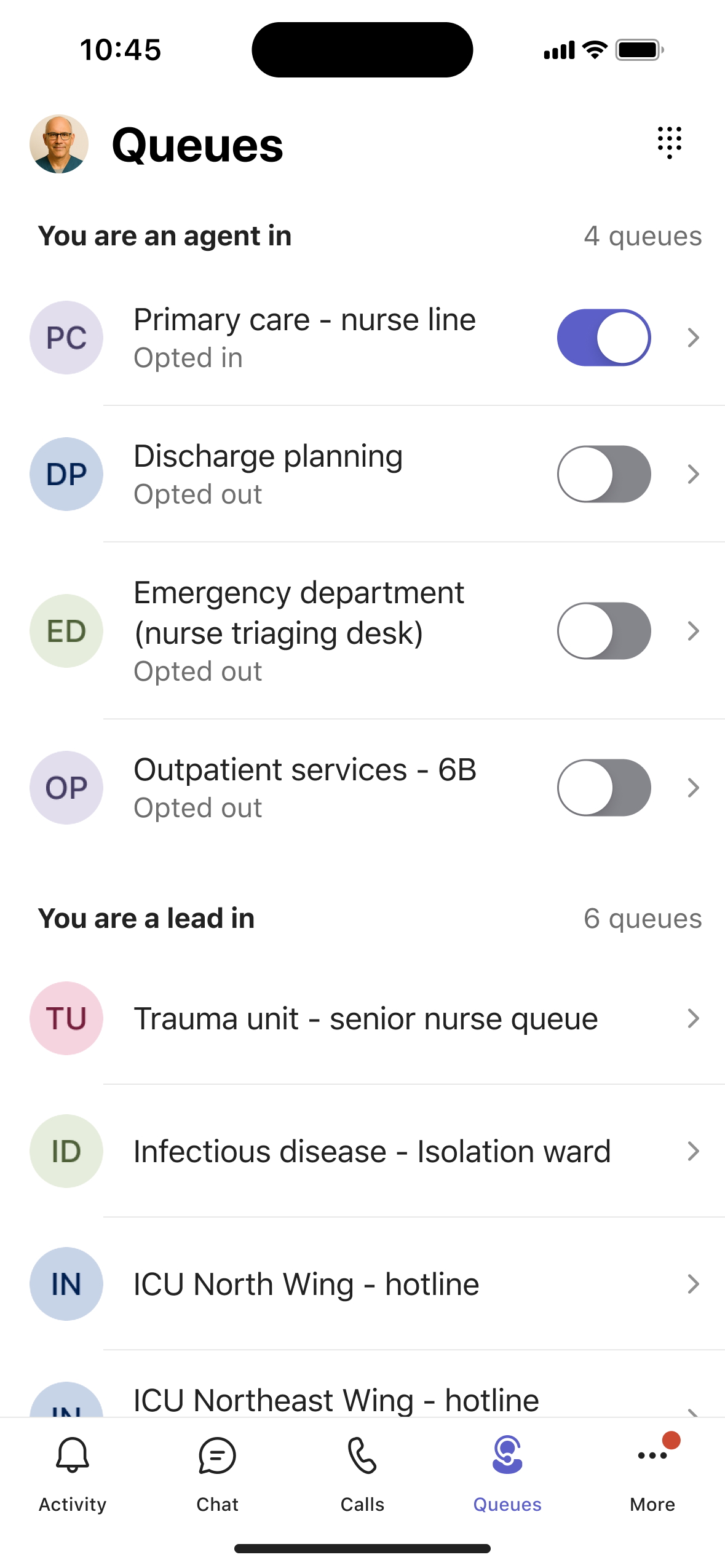
    • View the call queues they are assigned to directly from the Teams mobile app.
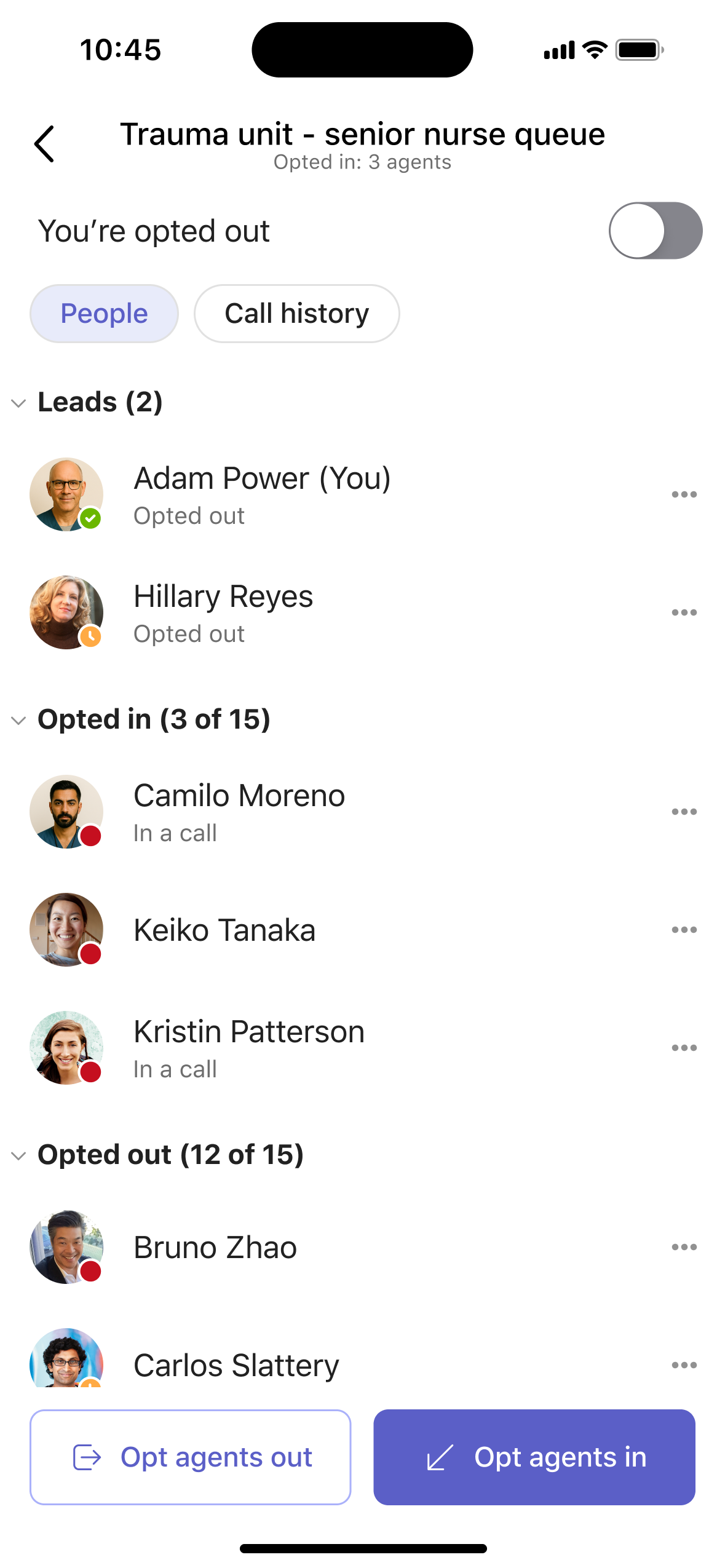
    • Review queue details, including the full list of queue members.
    • View queue-related call history on mobile devices.
  • Calling representatives will be able to:
    • Opt in or opt out of queue call routing while on the go.
  • Supervisor leads will be able to:
    • Bulk manage queue participation for their teams from mobile
  • The experience:
    • Is enabled by default for eligible users.
    • Respects existing licensing, policies, and administrative controls.
    • Matches the governance model of the desktop Queues app.

    This mobile access helps teams respond faster, manage calls more efficiently, and maintain a consistent customer experience regardless of location.

    Screenshot 1: Queues home view:
    user settings

    Screenshot 2: Queue details view:

    user settings

    [What you can do to prepare:]

    No action is required.

    You may optionally:

    • Ensure impacted users are licensed with Teams Phone and Teams Premium.
    • Inform calling representatives and supervisor leads who rely on mobile-first workflows about this new capability.
    • Update internal helpdesk or user documentation to reference mobile queue management.

    Learn more: Manage Queues app for Microsoft Teams - Microsoft Teams | Microsoft Learn (will be updated before rollout)

    [Compliance considerations:]

    Area Explanation
    New ways of communicating between users This change extends existing call queue communication workflows to the Microsoft Teams mobile app. Calling representatives and supervisor leads can manage queue participation.
    User ability to enable or disable the feature themselves Calling representatives can opt in or opt out of call queue participation directly from the Teams mobile app. This behavior is consistent with existing queue participation controls available on desktop and does not bypass admin policies or licensing requirements.

    Roadmap features referenced by this post

    Revision history

    1. 25 Aug 2026 07:01 UTC — Microsoft's lastModified 07 Jul 2026 16:38 UTC
    2. 25 Aug 2026 12:00 UTC — Microsoft's lastModified 07 Jul 2026 16:38 UTC
    3. 25 Aug 2026 18:00 UTC — Microsoft's lastModified 07 Jul 2026 16:38 UTC
    4. 26 Aug 2026 00:00 UTC — Microsoft's lastModified 07 Jul 2026 16:38 UTC
    5. 26 Aug 2026 06:00 UTC — Microsoft's lastModified 07 Jul 2026 16:38 UTC
    6. 26 Aug 2026 12:00 UTC — Microsoft's lastModified 07 Jul 2026 16:38 UTC
    7. 26 Aug 2026 18:00 UTC — Microsoft's lastModified 07 Jul 2026 16:38 UTC
    8. 27 Aug 2026 00:00 UTC — Microsoft's lastModified 07 Jul 2026 16:38 UTC
    9. 27 Aug 2026 06:00 UTC — Microsoft's lastModified 07 Jul 2026 16:38 UTC
    10. 27 Aug 2026 12:00 UTC — Microsoft's lastModified 07 Jul 2026 16:38 UTC
    11. 27 Aug 2026 18:00 UTC — Microsoft's lastModified 07 Jul 2026 16:38 UTC
    12. 28 Aug 2026 00:00 UTC — Microsoft's lastModified 07 Jul 2026 16:38 UTC
    13. 28 Aug 2026 06:00 UTC — Microsoft's lastModified 07 Jul 2026 16:38 UTC
    14. 28 Aug 2026 12:00 UTC — Microsoft's lastModified 07 Jul 2026 16:38 UTC
    15. 28 Aug 2026 18:00 UTC — Microsoft's lastModified 07 Jul 2026 16:38 UTC
    16. 29 Aug 2026 00:00 UTC — Microsoft's lastModified 07 Jul 2026 16:38 UTC
    17. 29 Aug 2026 06:00 UTC — Microsoft's lastModified 07 Jul 2026 16:38 UTC
    18. 29 Aug 2026 12:00 UTC — Microsoft's lastModified 07 Jul 2026 16:38 UTC
    19. 29 Aug 2026 18:00 UTC — Microsoft's lastModified 07 Jul 2026 16:38 UTC
    20. 30 Aug 2026 00:00 UTC — Microsoft's lastModified 07 Jul 2026 16:38 UTC
    21. 30 Aug 2026 06:00 UTC — Microsoft's lastModified 07 Jul 2026 16:38 UTC
    22. 30 Aug 2026 12:00 UTC — Microsoft's lastModified 07 Jul 2026 16:38 UTC
    23. 30 Aug 2026 18:00 UTC — Microsoft's lastModified 07 Jul 2026 16:38 UTC
    24. 31 Aug 2026 00:00 UTC — Microsoft's lastModified 07 Jul 2026 16:38 UTC
    25. 31 Aug 2026 06:00 UTC — Microsoft's lastModified 07 Jul 2026 16:38 UTC