

Changes › MC1316228

(Updated) Keyboard shortcut dialog has search functionality

Microsoft Teams Stay informed
Published
19 May 2026
Last modified
07 Jul 2026 16:44 UTC
Act by
Ends
31 Aug 2026
First archived
25 Aug 2026
Revisions
25
Summary
Microsoft Teams is adding search functionality to the Keyboard shortcuts dialog, enabling users to find shortcuts by action name or key combination. This feature, enabled by default, will roll out worldwide from early June to late July 2026, improving shortcut discoverability and customization without affecting existing workflows.
Platforms
Desktop, Mac, Web
RoadmapIds
562413
FeatureStatusJson
{"0":[{"RoadmapId":0,"McPostId":"MC1316228","Platform":"Desktop","Status":"FeatureRolloutStatusNotSupported","LastUpdateTime":"2026-08-31T06:00:22.1569779Z","LatestRing":null,"TenantRolloutRing":null},{"RoadmapId":0,"McPostId":"MC1316228","Platform":"Mac","Status":"FeatureRolloutStatusNotSupported","LastUpdateTime":"2026-08-31T06:00:22.156978Z","LatestRing":null,"TenantRolloutRing":null},{"RoadmapId":0,"McPostId":"MC1316228","Platform":"All","Status":"FeatureRolloutStatusNotSupported","LastUpdateTime":"2026-08-31T06:00:22.1569781Z","LatestRing":null,"TenantRolloutRing":null}]}
Tags
Updated messageNew featureUser impact

Full post

Updated July 7, 2026: We have updated the timeline. Thank you for your patience. 

[Introduction]

To improve discoverability and customization of keyboard shortcuts in Microsoft Teams, we’re adding search functionality to the Keyboard shortcuts dialog. This enhancement helps users quickly find shortcuts by either the action name or the key combination, reducing time spent scanning long lists and making shortcut customization easier and more efficient.

This message applies to Teams for Windows desktop, Teams for Mac desktop, and Teams for the web. It is associated with Roadmap ID 562413.

[When this will happen:]

  • Targeted Release (Worldwide): We will begin rolling out in early June 2026 and expect to complete by early June 2026.
  • General Availability (Worldwide): We will begin rolling out in early June 2026 and expect to complete by late July 2026 (previously late June).

[How this affects your organization:]

Who is affected:

  • All Microsoft Teams users who access the Keyboard shortcuts dialog.

What will happen:

  • Users can search for keyboard shortcuts by:
    • The name of the action (for example, “Mute” or “Open settings”).
    • The keyboard shortcut combination (for example, “Ctrl+Shift+M”).
  • The enhancement applies to:
    • Viewing existing shortcuts.
    • Customizing personal keyboard shortcuts.
  • The feature is enabled by default.
  • Existing Teams policies and admin configurations are respected.
  • No changes to user workflows unless users choose to search or customize shortcuts.
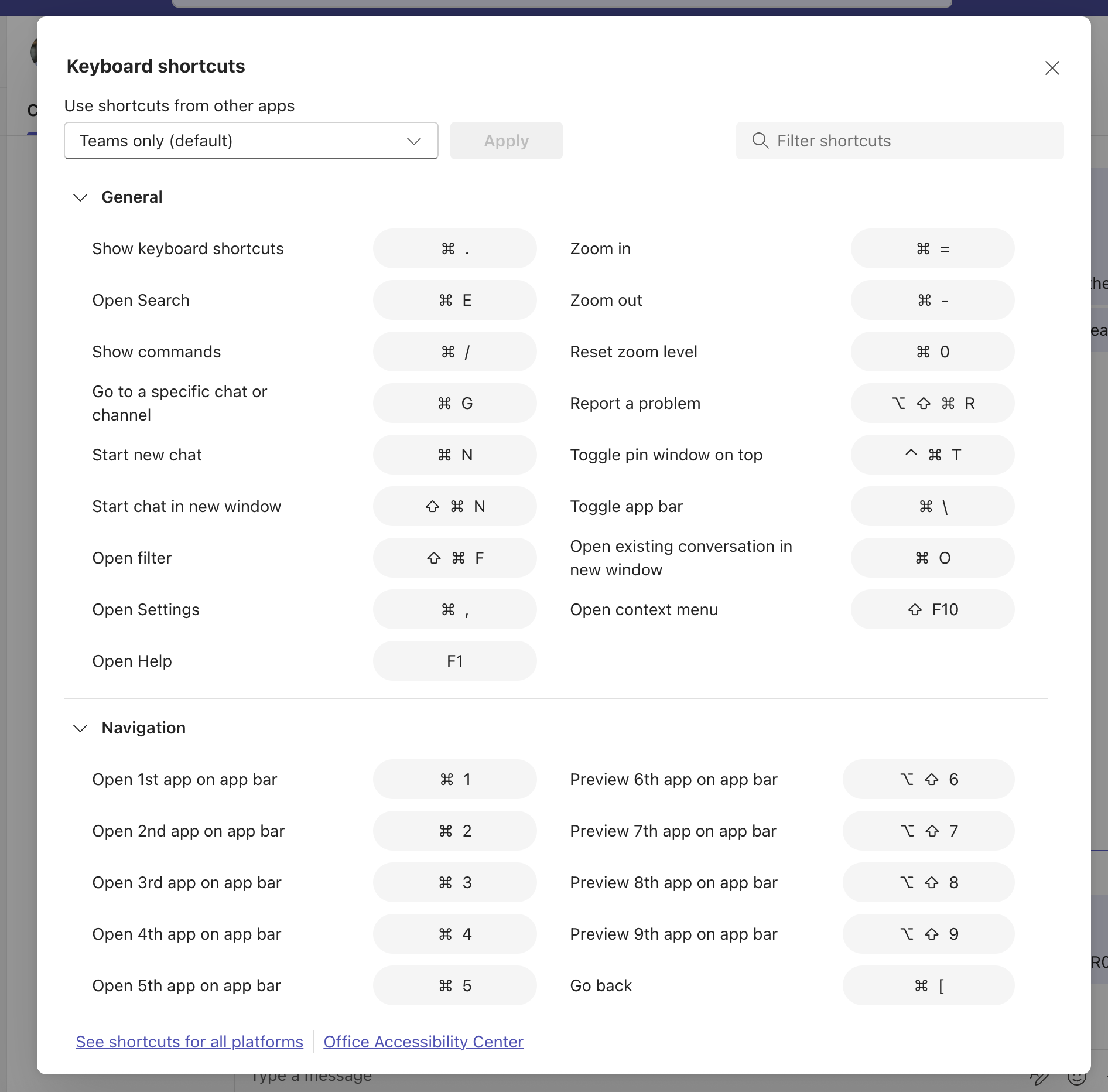
  • Screenshot 1: Default keyboard shortcut dialog experience:
    user settings

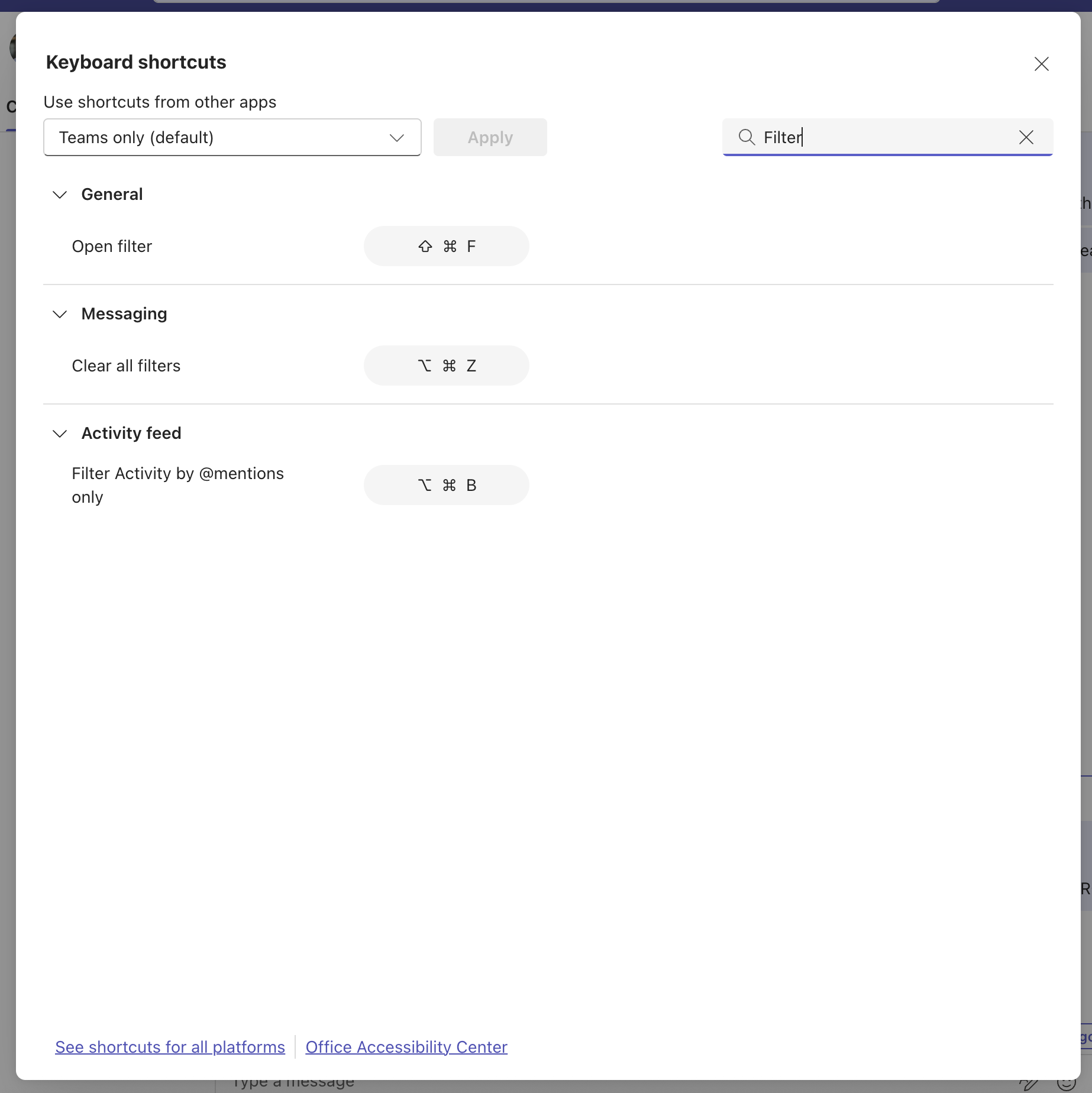
    Screenshot 2: Use the search box in the upper-right corner to enter a keyword and find relevant keyboard shortcuts:
    user settings

[What you can do to prepare:]

  • No action is required.
  • Consider the following optional steps:
    • Inform helpdesk and support teams about the improved shortcut discovery experience.
    • Update internal user training or documentation that references Teams keyboard shortcuts.
    • Share a short tip with users highlighting that shortcuts can now be searched by name or key combination.

[Compliance considerations:]

The change allows users to choose whether to use the new search capability within the Keyboard shortcuts dialog. No other compliance impacts have been identified.

Roadmap features referenced by this post

Revision history

  1. 25 Aug 2026 07:01 UTC — Microsoft's lastModified 07 Jul 2026 16:44 UTC
  2. 25 Aug 2026 12:00 UTC — Microsoft's lastModified 07 Jul 2026 16:44 UTC
  3. 25 Aug 2026 18:00 UTC — Microsoft's lastModified 07 Jul 2026 16:44 UTC
  4. 26 Aug 2026 00:00 UTC — Microsoft's lastModified 07 Jul 2026 16:44 UTC
  5. 26 Aug 2026 06:00 UTC — Microsoft's lastModified 07 Jul 2026 16:44 UTC
  6. 26 Aug 2026 12:00 UTC — Microsoft's lastModified 07 Jul 2026 16:44 UTC
  7. 26 Aug 2026 18:00 UTC — Microsoft's lastModified 07 Jul 2026 16:44 UTC
  8. 27 Aug 2026 00:00 UTC — Microsoft's lastModified 07 Jul 2026 16:44 UTC
  9. 27 Aug 2026 06:00 UTC — Microsoft's lastModified 07 Jul 2026 16:44 UTC
  10. 27 Aug 2026 12:00 UTC — Microsoft's lastModified 07 Jul 2026 16:44 UTC
  11. 27 Aug 2026 18:00 UTC — Microsoft's lastModified 07 Jul 2026 16:44 UTC
  12. 28 Aug 2026 00:00 UTC — Microsoft's lastModified 07 Jul 2026 16:44 UTC
  13. 28 Aug 2026 06:00 UTC — Microsoft's lastModified 07 Jul 2026 16:44 UTC
  14. 28 Aug 2026 12:00 UTC — Microsoft's lastModified 07 Jul 2026 16:44 UTC
  15. 28 Aug 2026 18:00 UTC — Microsoft's lastModified 07 Jul 2026 16:44 UTC
  16. 29 Aug 2026 00:00 UTC — Microsoft's lastModified 07 Jul 2026 16:44 UTC
  17. 29 Aug 2026 06:00 UTC — Microsoft's lastModified 07 Jul 2026 16:44 UTC
  18. 29 Aug 2026 12:00 UTC — Microsoft's lastModified 07 Jul 2026 16:44 UTC
  19. 29 Aug 2026 18:00 UTC — Microsoft's lastModified 07 Jul 2026 16:44 UTC
  20. 30 Aug 2026 00:00 UTC — Microsoft's lastModified 07 Jul 2026 16:44 UTC
  21. 30 Aug 2026 06:00 UTC — Microsoft's lastModified 07 Jul 2026 16:44 UTC
  22. 30 Aug 2026 12:00 UTC — Microsoft's lastModified 07 Jul 2026 16:44 UTC
  23. 30 Aug 2026 18:00 UTC — Microsoft's lastModified 07 Jul 2026 16:44 UTC
  24. 31 Aug 2026 00:00 UTC — Microsoft's lastModified 07 Jul 2026 16:44 UTC
  25. 31 Aug 2026 06:00 UTC — Microsoft's lastModified 07 Jul 2026 16:44 UTC