

Updated June 15, 2026: We have updated the timeline. Thank you for your patience.
[Introduction]
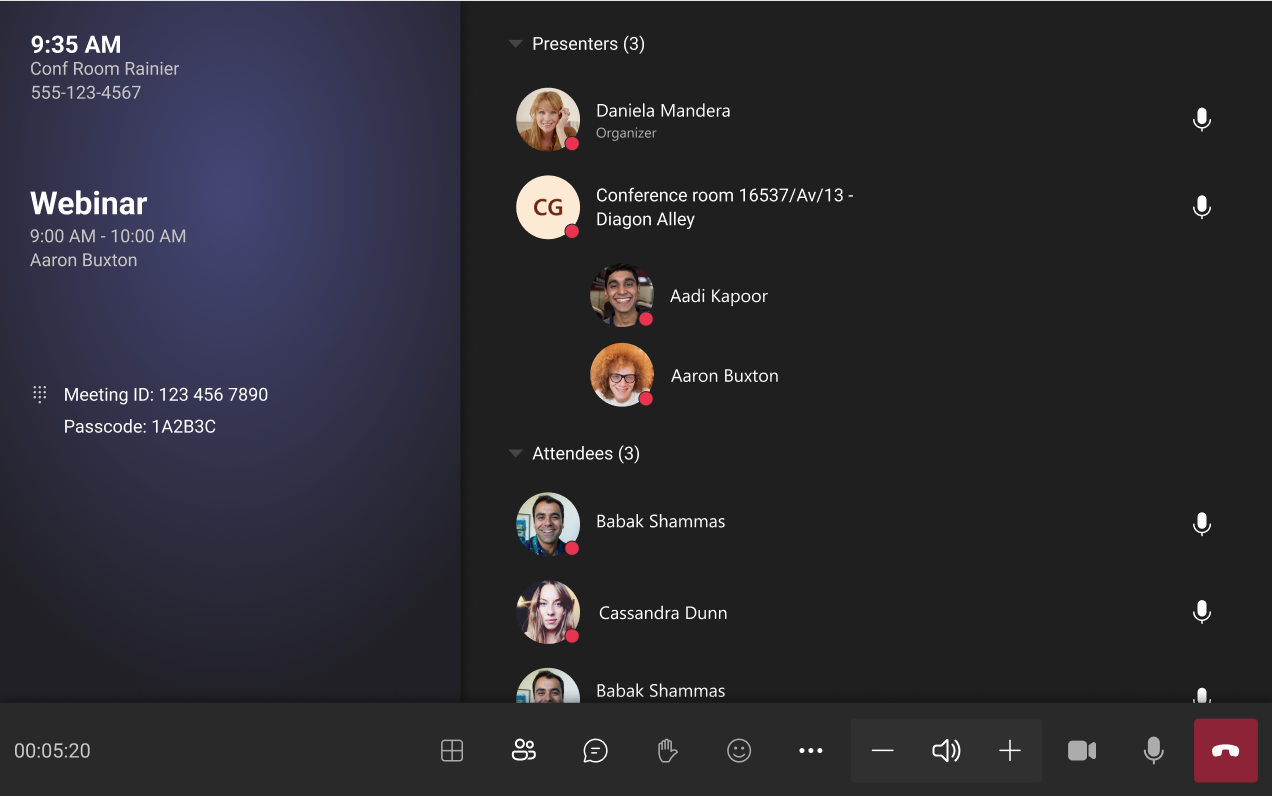
Microsoft Teams Rooms on Android (MTR-A) will support joining webinars and structured meetings with a dedicated attendee experience. Structured meetings are meetings where organizers restrict presenter permissions and assign attendee roles. This update enables room devices to join these event types as attendees and use attendee features during the session. This capability requires Teams Rooms Pro.
This message is associated with Microsoft 365 Roadmap ID 547824.
[When this will happen:]
General Availability (Worldwide): Rollout begins in late June 2026 and is expected to complete by mid-July 2026.
GCC: Rollout begins in late June 2026 and is expected to complete by early July 2026.
GCC-H: Rollout begins in late August 2026 and is expected to complete by early September 2026.
DoD: Rollout begins in late September 2026 and is expected to complete by early October 2026.
[How this affects your organization:]
Who is affected:
- Organizations using Microsoft Teams Rooms on Android (MTR-A) with Teams Rooms Pro licenses
- Admins managing Teams Rooms devices and meeting policies
- Users joining webinars or structured meetings from conference rooms
What will happen:
- Microsoft Teams Rooms on Android (MTR-A) devices can join webinars and structured meetings as attendees from the room console.
- Rooms will use an attendee role-based experience, separate from presenter controls and views.
- When enabled by meeting options, room attendees can use:
- Chat
- Reactions
- Raise hand
- Captions
- Participant roster and visibility controls
- Rooms no longer require a separate personal device to participate in these sessions.
- Layouts are optimized for single-screen and dual-screen rooms to emphasize shared content and active speaker or stage view.
- For webinars and structured meetings, the room display (front‑of‑room) can be restricted to curated stage content, using managed or on‑stage view behavior.
- Organizers can include rooms as attendees; attendee identity may not be shown in webinars, depending on event configuration.
- Availability depends on the device running a version of Teams Rooms on Android that supports this feature.
- Rooms can be used for co-viewing webinars and structured meetings, allowing multiple in-room participants to join from a shared device while still accessing attendee features.
- Supports use in large conference rooms and organization-wide events.
- Applicable to scenarios such as training sessions, organization-wide updates, and leadership broadcasts.
Screenshot 1: Webinar front-of-room experience:

Screenshot 2: Webinar console view:
[What you can do to prepare:]
- Ensure your Teams Rooms on Android devices are:
- Enabled and actively managed.
- Licensed with Teams Rooms Pro (validated at join time)/
- Update Teams Rooms devices to the latest available version.
- Review internal guidance for meeting organizers to:
- Add rooms as attendees where appropriate.
- Configure meeting options to allow desired attendee interactions (chat, reactions, etc.).
- Communicate this update to helpdesk and user communities, especially teams that host webinars or large meetings.
Learn more: Host or attend an event from a Microsoft Teams Room (MTR) - Microsoft Support
[Compliance considerations:]
No compliance considerations identified, review as appropriate for your organization.