

Changes › MC1419798

(Updated) Microsoft Teams Rooms: Identify in-room participants with IntelliFrame people labels

Microsoft Teams Major change Plan for change
Published
07 Jul 2026
Last modified
20 Aug 2026 21:19 UTC
Act by
Ends
30 Nov 2026
First archived
25 Aug 2026
Revisions
40
Summary
Microsoft Teams Rooms on Windows will introduce IntelliFrame people labels by mid-October 2026, automatically identifying enrolled in-room participants with name labels and contact cards for remote attendees. This feature enhances hybrid meetings, requires Teams Rooms Pro licenses, supports voice and face recognition enrollment, and can be managed via Teams meeting policies.
Platforms
Desktop, Mac, TeamsAndSurfaceDevices
RoadmapIds
566700
FeatureStatusJson
{"0":[{"RoadmapId":0,"McPostId":"MC1419798","Platform":"Desktop","Status":"FeatureRolloutStatusNotSupported","LastUpdateTime":"2026-09-03T18:00:31.7151997Z","LatestRing":null,"TenantRolloutRing":null},{"RoadmapId":0,"McPostId":"MC1419798","Platform":"Mac","Status":"FeatureRolloutStatusNotSupported","LastUpdateTime":"2026-09-03T18:00:31.7151998Z","LatestRing":null,"TenantRolloutRing":null},{"RoadmapId":0,"McPostId":"MC1419798","Platform":"All","Status":"FeatureRolloutStatusNotSupported","LastUpdateTime":"2026-09-03T18:00:31.7151998Z","LatestRing":null,"TenantRolloutRing":null}]}
Tags
Updated messageNew featureUser impact

Full post

Updated August 20, 2026: We have updated the timeline. Thank you for your patience.

[What and Why:]

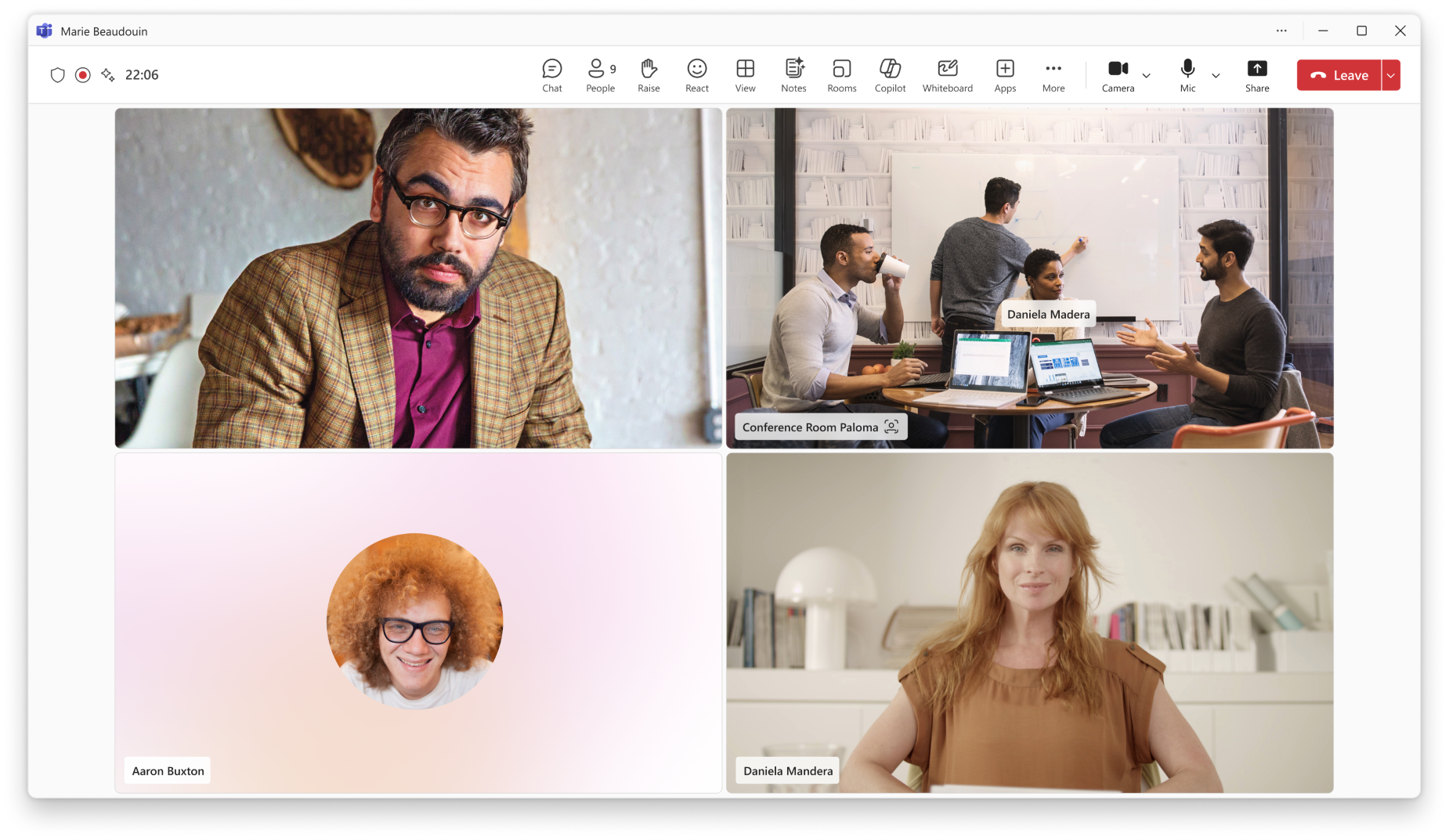
We're introducing IntelliFrame people labels in Microsoft Teams Rooms on Windows to improve meeting clarity and inclusivity for remote participants. When enabled, this feature identifies in-room participants by name and displays a contact card, helping remote attendees easily recognize speakers and follow conversations.

This enhancement supports better hybrid meeting experiences by connecting in-room and remote participants more effectively, improving collaboration and productivity.

This message is associated with Microsoft 365 Roadmap ID 566700.

[Rollout Schedule:]

  1. General Availability (Worldwide, GCC): Beginning mid-October 2026 (previously early September); expected to complete by late October 2026 (previously late September)

[Impact on Your Organization:]

Who is affected:

  1. Organizations using Microsoft Teams Rooms on Windows with Teams Rooms Pro licenses
  2. In-room participants who have enrolled in voice and face recognition (People Recognition)

Platforms/Services:

  1. Microsoft Teams
  2. Teams Rooms on Windows devices
  3. Supported intelligent camera hardware

What will happen:

  1. IntelliFrame will display name labels under identified in-room participants’ video feeds.
  2. Remote participants can select a label to view a contact card with organizational details.
  3. The feature is enabled automatically when prerequisites are met.
  4. Existing Teams meeting policies for voice and face enrollment are honored.
  5. Participants without enrolled profiles will appear without labels.
  6. No change occurs if voice and face enrollment is disabled in your organization.

Screenshot - IntelliFrame people labels identify enrolled in-room participants by name, helping remote attendees recognize who's speaking; selecting a label opens the person's contact card
[Action Required/Recommendations:]

No action is required to enable this feature.

To maximize value, administrators may:

  1. Review and confirm Teams Rooms devices:
  2. Ensure devices are licensed with Teams Rooms Pro.
  3. Verify use of supported intelligent cameras.
  4. Review and update meeting policies:
  5. Allow enrollment: Set-CsTeamsMeetingPolicy -EnrollUserOverride Enabled.
  6. Enable name display in rooms: Set-CsTeamsMeetingPolicy -RoomPeopleNameUserOverride On.
  7. Encourage users to enroll in voice and face recognition: Teams > Settings > Recognition.
  8. Update internal documentation and helpdesk guidance.
  9. Notify users about this capability to drive awareness and adoption.

To disable IntelliFrame people labels, administrators can:

  1. Turn off in-room name display (labels stop; other IntelliFrame framing unaffected): Set-CsTeamsMeetingPolicy -RoomPeopleNameUserOverride Off
  2. Block voice and face enrollment entirely (no one can be identified by name): Set-CsTeamsMeetingPolicy -EnrollUserOverride Disabled
  3. Individual users can opt out anytime by removing their profile in Teams > Settings > Recognition.

Learn more:

  1. What is Microsoft Multi-Stream IntelliFrame and Intelligent Camera? | Microsoft Learn (will be updated before rollout)
  2. Enable People Recognition on Teams Rooms (voice & face policies) | Microsoft Learn (will be updated before rollout)
  3. Overview and configuration of voice and face enrollment | Microsoft Learn (will be updated before rollout)

[Compliance considerations:]

Compliance AreaImpact
Introduces or modifies AI/ML capabilitiesUses AI-based biometric identification (voice and face profiles) to identify in-room participants. Identification occurs only for users who have consented and completed People Recognition enrollment.
Stores new customer dataThis feature does not create new data; it relies on existing voice and face profiles from People Recognition enrollment, governed by the organization’s current configuration.
Alters processing of existing customer dataParticipant identity data is processed differently when recognition is enabled.
Provides new way of communicating between usersLabels and contact cards enhance visibility of in-room participants for remote users.
Adds or changes admin controlsControlled via Teams meeting policies (EnrollUserOverride and RoomPeopleNameUserOverride).
Allows users to enable/disable the featureUsers can enroll or opt out of voice and face profiles in Teams settings.

Commands mentioned in this post

Roadmap features referenced by this post

Revision history

  1. 25 Aug 2026 07:01 UTC — Microsoft's lastModified 20 Aug 2026 21:19 UTC
  2. 25 Aug 2026 12:00 UTC — Microsoft's lastModified 20 Aug 2026 21:19 UTC
  3. 25 Aug 2026 18:00 UTC — Microsoft's lastModified 20 Aug 2026 21:19 UTC
  4. 26 Aug 2026 00:00 UTC — Microsoft's lastModified 20 Aug 2026 21:19 UTC
  5. 26 Aug 2026 06:00 UTC — Microsoft's lastModified 20 Aug 2026 21:19 UTC
  6. 26 Aug 2026 12:00 UTC — Microsoft's lastModified 20 Aug 2026 21:19 UTC
  7. 26 Aug 2026 18:00 UTC — Microsoft's lastModified 20 Aug 2026 21:19 UTC
  8. 27 Aug 2026 00:00 UTC — Microsoft's lastModified 20 Aug 2026 21:19 UTC
  9. 27 Aug 2026 06:00 UTC — Microsoft's lastModified 20 Aug 2026 21:19 UTC
  10. 27 Aug 2026 12:00 UTC — Microsoft's lastModified 20 Aug 2026 21:19 UTC
  11. 27 Aug 2026 18:00 UTC — Microsoft's lastModified 20 Aug 2026 21:19 UTC
  12. 28 Aug 2026 00:00 UTC — Microsoft's lastModified 20 Aug 2026 21:19 UTC
  13. 28 Aug 2026 06:00 UTC — Microsoft's lastModified 20 Aug 2026 21:19 UTC
  14. 28 Aug 2026 12:00 UTC — Microsoft's lastModified 20 Aug 2026 21:19 UTC
  15. 28 Aug 2026 18:00 UTC — Microsoft's lastModified 20 Aug 2026 21:19 UTC
  16. 29 Aug 2026 00:00 UTC — Microsoft's lastModified 20 Aug 2026 21:19 UTC
  17. 29 Aug 2026 06:00 UTC — Microsoft's lastModified 20 Aug 2026 21:19 UTC
  18. 29 Aug 2026 12:00 UTC — Microsoft's lastModified 20 Aug 2026 21:19 UTC
  19. 29 Aug 2026 18:00 UTC — Microsoft's lastModified 20 Aug 2026 21:19 UTC
  20. 30 Aug 2026 00:00 UTC — Microsoft's lastModified 20 Aug 2026 21:19 UTC
  21. 30 Aug 2026 06:00 UTC — Microsoft's lastModified 20 Aug 2026 21:19 UTC
  22. 30 Aug 2026 12:00 UTC — Microsoft's lastModified 20 Aug 2026 21:19 UTC
  23. 30 Aug 2026 18:00 UTC — Microsoft's lastModified 20 Aug 2026 21:19 UTC
  24. 31 Aug 2026 00:00 UTC — Microsoft's lastModified 20 Aug 2026 21:19 UTC
  25. 31 Aug 2026 06:00 UTC — Microsoft's lastModified 20 Aug 2026 21:19 UTC
  26. 31 Aug 2026 12:00 UTC — Microsoft's lastModified 20 Aug 2026 21:19 UTC
  27. 31 Aug 2026 15:13 UTC — Microsoft's lastModified 20 Aug 2026 21:19 UTC
  28. 31 Aug 2026 18:00 UTC — Microsoft's lastModified 20 Aug 2026 21:19 UTC
  29. 01 Sep 2026 00:00 UTC — Microsoft's lastModified 20 Aug 2026 21:19 UTC
  30. 01 Sep 2026 06:00 UTC — Microsoft's lastModified 20 Aug 2026 21:19 UTC
  31. 01 Sep 2026 12:00 UTC — Microsoft's lastModified 20 Aug 2026 21:19 UTC
  32. 01 Sep 2026 18:00 UTC — Microsoft's lastModified 20 Aug 2026 21:19 UTC
  33. 02 Sep 2026 00:00 UTC — Microsoft's lastModified 20 Aug 2026 21:19 UTC
  34. 02 Sep 2026 06:00 UTC — Microsoft's lastModified 20 Aug 2026 21:19 UTC
  35. 02 Sep 2026 12:00 UTC — Microsoft's lastModified 20 Aug 2026 21:19 UTC
  36. 02 Sep 2026 18:00 UTC — Microsoft's lastModified 20 Aug 2026 21:19 UTC
  37. 03 Sep 2026 00:00 UTC — Microsoft's lastModified 20 Aug 2026 21:19 UTC
  38. 03 Sep 2026 06:00 UTC — Microsoft's lastModified 20 Aug 2026 21:19 UTC
  39. 03 Sep 2026 12:00 UTC — Microsoft's lastModified 20 Aug 2026 21:19 UTC
  40. 03 Sep 2026 18:00 UTC — Microsoft's lastModified 20 Aug 2026 21:19 UTC