

Changes › MC1442609

Microsoft Teams: Teams shared display mode and peripheral detection for BYOD spaces

Microsoft Teams Stay informed
Published
29 Jul 2026
Last modified
29 Jul 2026 23:07 UTC
Act by
Ends
10 Sep 2026
First archived
25 Aug 2026
Revisions
40
Summary
Microsoft Teams is introducing shared display mode and enhanced peripheral detection for BYOD meeting spaces to improve meeting join experience and privacy. Rollout begins late July 2026. Administrators gain new reporting and device health insights in Teams Pro Management portal, with options to opt out of data collection. Users can disable automatic meeting room mode.
Platforms
Desktop, Mac
RoadmapIds
567465
FeatureStatusJson
{"0":[{"RoadmapId":0,"McPostId":"MC1442609","Platform":"Desktop","Status":"FeatureRolloutStatusNotSupported","LastUpdateTime":"2026-09-03T18:00:31.7151155Z","LatestRing":null,"TenantRolloutRing":null},{"RoadmapId":0,"McPostId":"MC1442609","Platform":"Mac","Status":"FeatureRolloutStatusNotSupported","LastUpdateTime":"2026-09-03T18:00:31.7151156Z","LatestRing":null,"TenantRolloutRing":null},{"RoadmapId":0,"McPostId":"MC1442609","Platform":"All","Status":"FeatureRolloutStatusNotSupported","LastUpdateTime":"2026-09-03T18:00:31.7151156Z","LatestRing":null,"TenantRolloutRing":null}]}
Tags
New featureUser impactAdmin impact

Full post

[What and why]

We're introducing Teams shared display mode and enhanced peripheral detection for bring-your-own-device (BYOD) meeting spaces. These updates help users join meetings more seamlessly using certified room devices while improving privacy by preventing personal content from appearing on shared room displays. The update also provides administrators with improved inventory management and reporting capabilities through the Teams Pro Management portal.

[Rollout schedule]

  • Targeted Release: Beginning in late July 2026 and is expected to complete by early August 2026
  • General Availability (DoD): Beginning in early August 2026 and is expected to complete by mid-August 2026

[Impact on your organization]

Who is affected

  • Organizations using Teams BYOD meeting spaces
  • Users who join Teams meetings using Teams Rooms-certified AV bars or room-associated USB peripherals 

  • Administrators who manage BYOD devices and reporting in the Teams Pro Management portal
Platforms and services

  • Microsoft Teams
  • Teams BYOD meeting rooms
  • Teams Rooms-certified peripherals
  • Teams Pro Management portal

What will happen

For users

When a Teams Rooms-certified AV bar or associated room peripheral is detected:

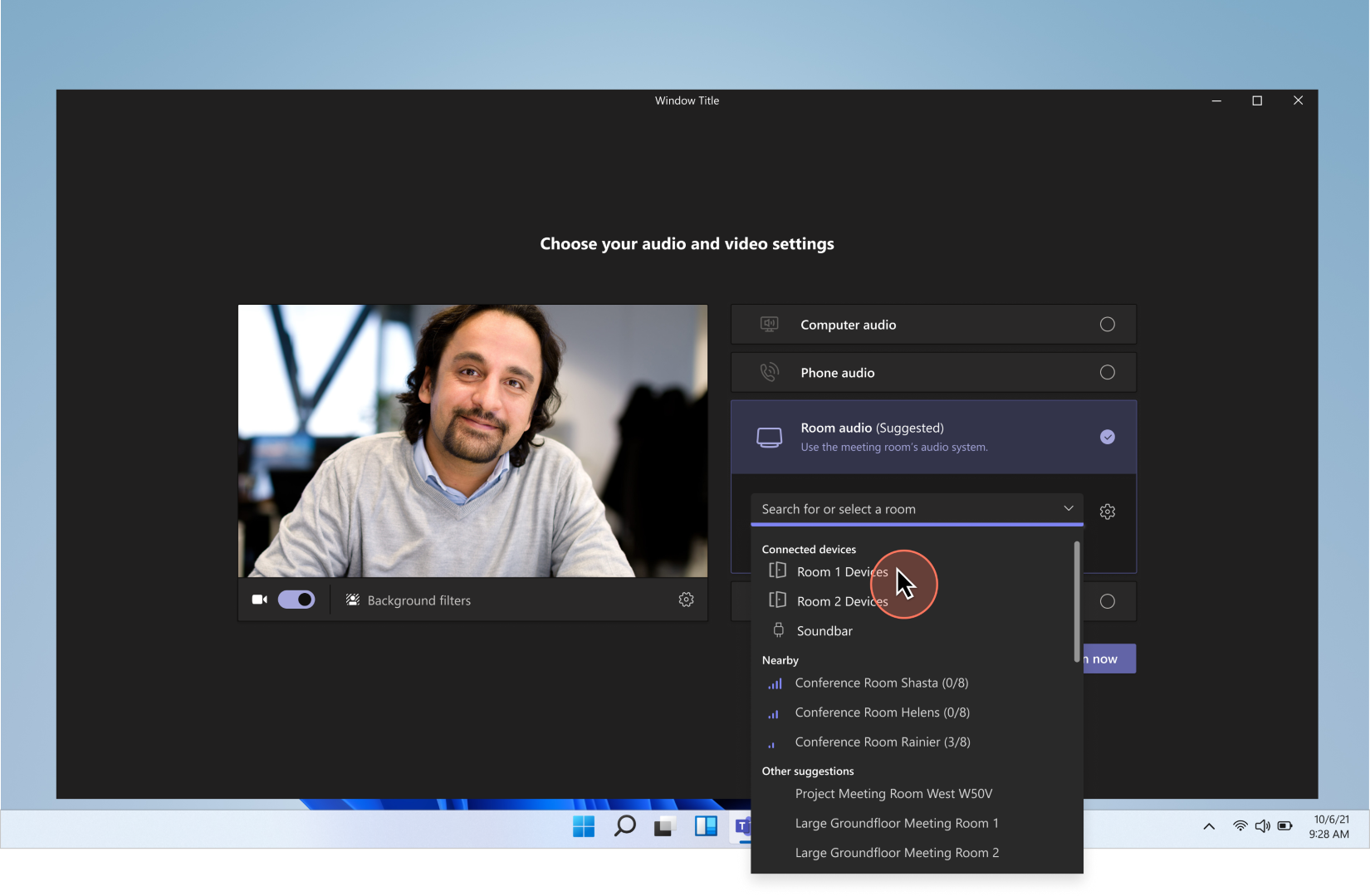
  • Room audio may be automatically selected in the Teams pre-join experience.
  • Meeting room mode may automatically activate when users join using room audio and a connected room-associated USB peripheral.
  • Meeting room mode enables:
    • Use of room devices as the active camera, microphone, and speaker. 
    • Shared display mode, which helps prevent private content from being shown on shared room displays.
    • Automatic disabling of voice isolation during meetings.
    • Automatic enablement of speaker attribution when transcription is enabled, subject to tenant policies and licensing requirements.
    • Users can disable automatic meeting room mode activation in Teams > Settings > Devices.

For administrators

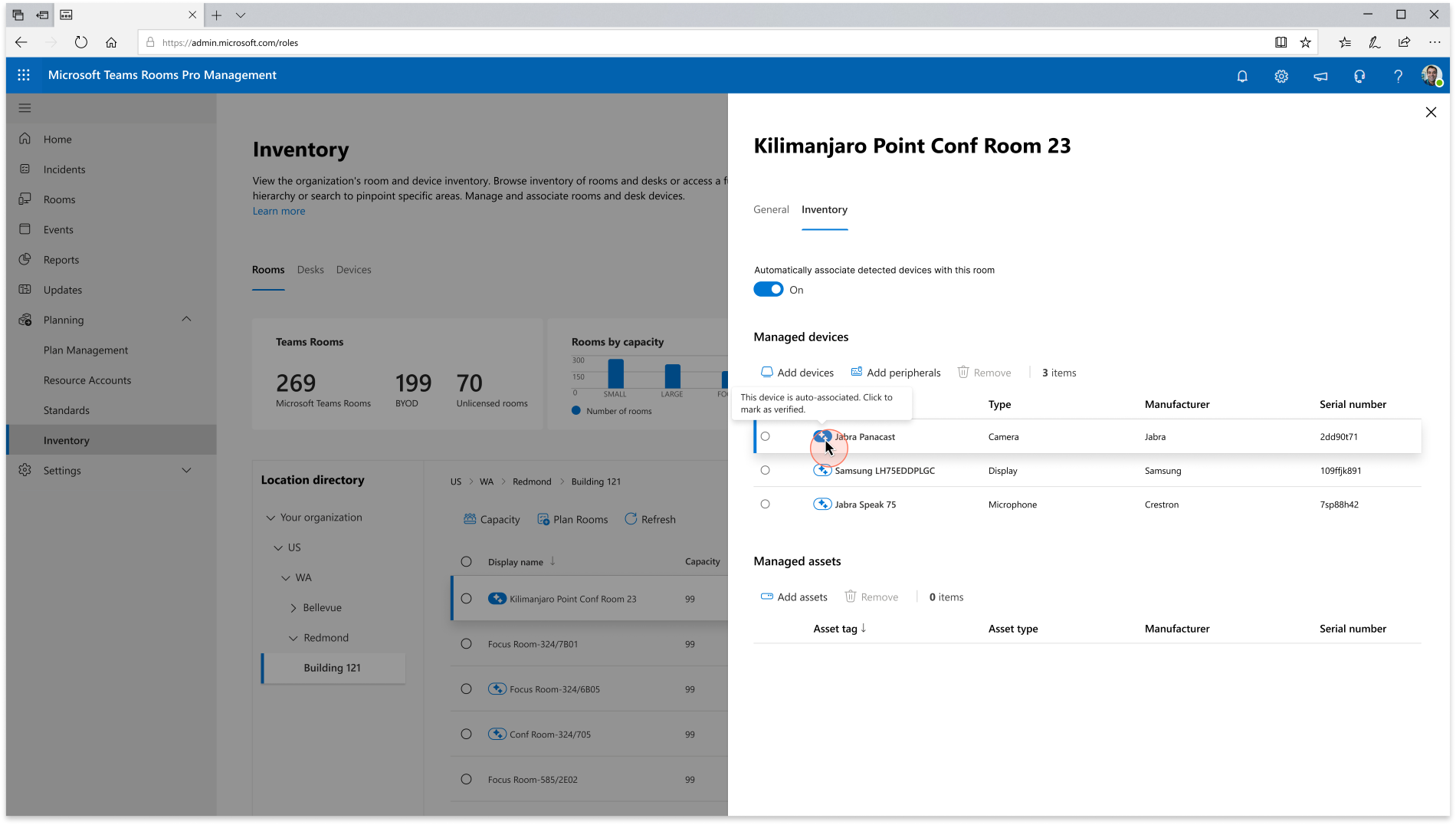
  • BYOD peripheral data will be collected and available by default in the Teams Pro Management portal: 

  • Administrators can associate validated peripherals with meeting rooms to enable automatic meeting room mode activation.
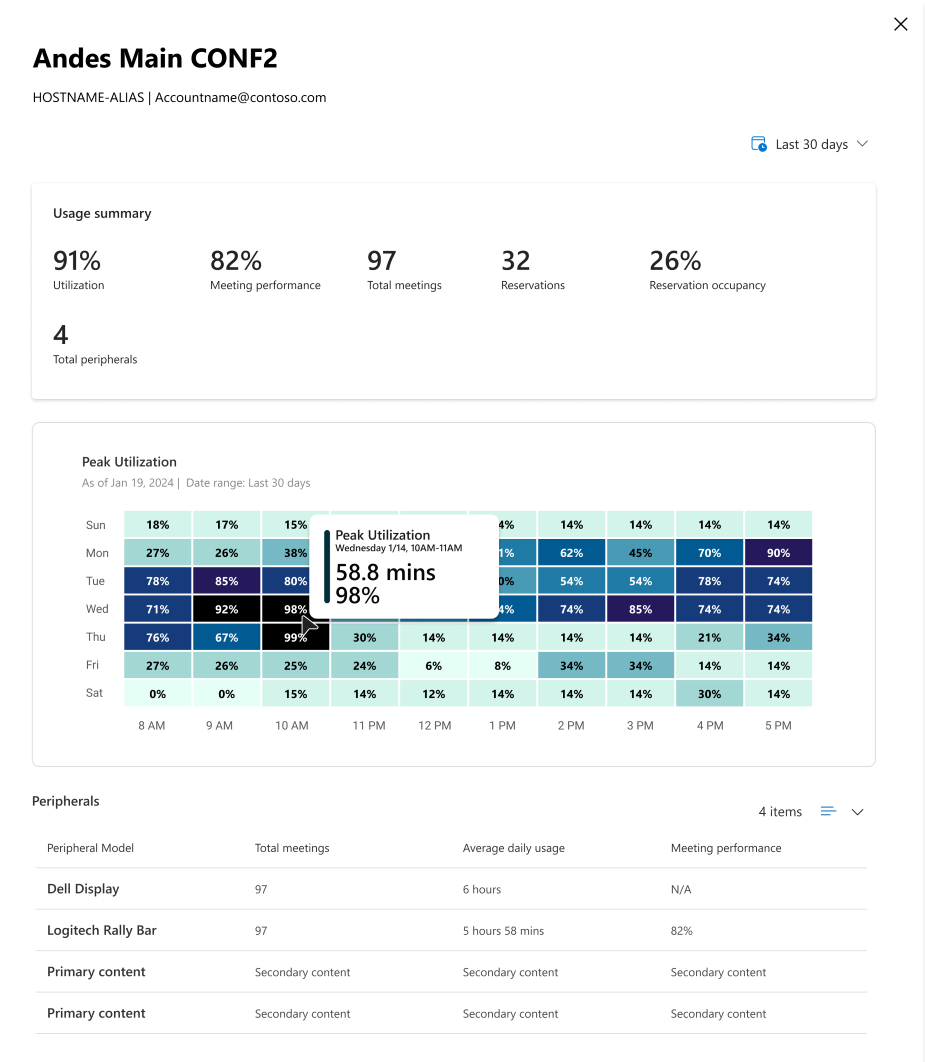
  • Additional reporting and device health insights will be available.
  • Insights are limited to validated shared room devices. Personal device data is not visible to administrators.
  • Existing administrative controls can be used to opt out of peripheral data collection.
[Action required and recommendations]

Review your BYOD meeting room deployment and determine whether peripheral association and reporting capabilities are appropriate for your organization.

We recommend that administrators:

  • Familiarize themselves with meeting room mode behavior and activation requirements.
  • Communicate the new meeting room experience to affected users.
  • Review peripheral association and reporting capabilities in the Teams Pro Management portal.
  • Evaluate existing policies related to BYOD meeting spaces and adjust them if necessary.

No additional technical prerequisites are required.

Learn more

[Compliance considerations]

QuestionAnswer
Does this change alter how admins monitor, report on, or demonstrate compliance activities?Yes. Administrators will have access to new reporting and device health insights for validated shared BYOD meeting room peripherals through the Teams Pro Management portal.
Does this change store new customer data or collect new organizational data?Yes. BYOD peripheral inventory, usage, and health data for validated shared room devices will be collected and made available in the Teams Pro Management portal by default.
Does this change include an admin control?Yes. Administrators can opt out of peripheral data collection by using existing administrative controls.
Does this change allow users to enable or disable the feature themselves?Yes. Users can disable automatic meeting room mode activation in Teams by navigating to Settings > Devices.

Roadmap features referenced by this post

Revision history

  1. 25 Aug 2026 07:01 UTC — Microsoft's lastModified 29 Jul 2026 23:07 UTC
  2. 25 Aug 2026 12:00 UTC — Microsoft's lastModified 29 Jul 2026 23:07 UTC
  3. 25 Aug 2026 18:00 UTC — Microsoft's lastModified 29 Jul 2026 23:07 UTC
  4. 26 Aug 2026 00:00 UTC — Microsoft's lastModified 29 Jul 2026 23:07 UTC
  5. 26 Aug 2026 06:00 UTC — Microsoft's lastModified 29 Jul 2026 23:07 UTC
  6. 26 Aug 2026 12:00 UTC — Microsoft's lastModified 29 Jul 2026 23:07 UTC
  7. 26 Aug 2026 18:00 UTC — Microsoft's lastModified 29 Jul 2026 23:07 UTC
  8. 27 Aug 2026 00:00 UTC — Microsoft's lastModified 29 Jul 2026 23:07 UTC
  9. 27 Aug 2026 06:00 UTC — Microsoft's lastModified 29 Jul 2026 23:07 UTC
  10. 27 Aug 2026 12:00 UTC — Microsoft's lastModified 29 Jul 2026 23:07 UTC
  11. 27 Aug 2026 18:00 UTC — Microsoft's lastModified 29 Jul 2026 23:07 UTC
  12. 28 Aug 2026 00:00 UTC — Microsoft's lastModified 29 Jul 2026 23:07 UTC
  13. 28 Aug 2026 06:00 UTC — Microsoft's lastModified 29 Jul 2026 23:07 UTC
  14. 28 Aug 2026 12:00 UTC — Microsoft's lastModified 29 Jul 2026 23:07 UTC
  15. 28 Aug 2026 18:00 UTC — Microsoft's lastModified 29 Jul 2026 23:07 UTC
  16. 29 Aug 2026 00:00 UTC — Microsoft's lastModified 29 Jul 2026 23:07 UTC
  17. 29 Aug 2026 06:00 UTC — Microsoft's lastModified 29 Jul 2026 23:07 UTC
  18. 29 Aug 2026 12:00 UTC — Microsoft's lastModified 29 Jul 2026 23:07 UTC
  19. 29 Aug 2026 18:00 UTC — Microsoft's lastModified 29 Jul 2026 23:07 UTC
  20. 30 Aug 2026 00:00 UTC — Microsoft's lastModified 29 Jul 2026 23:07 UTC
  21. 30 Aug 2026 06:00 UTC — Microsoft's lastModified 29 Jul 2026 23:07 UTC
  22. 30 Aug 2026 12:00 UTC — Microsoft's lastModified 29 Jul 2026 23:07 UTC
  23. 30 Aug 2026 18:00 UTC — Microsoft's lastModified 29 Jul 2026 23:07 UTC
  24. 31 Aug 2026 00:00 UTC — Microsoft's lastModified 29 Jul 2026 23:07 UTC
  25. 31 Aug 2026 06:00 UTC — Microsoft's lastModified 29 Jul 2026 23:07 UTC
  26. 31 Aug 2026 12:00 UTC — Microsoft's lastModified 29 Jul 2026 23:07 UTC
  27. 31 Aug 2026 15:13 UTC — Microsoft's lastModified 29 Jul 2026 23:07 UTC
  28. 31 Aug 2026 18:00 UTC — Microsoft's lastModified 29 Jul 2026 23:07 UTC
  29. 01 Sep 2026 00:00 UTC — Microsoft's lastModified 29 Jul 2026 23:07 UTC
  30. 01 Sep 2026 06:00 UTC — Microsoft's lastModified 29 Jul 2026 23:07 UTC
  31. 01 Sep 2026 12:00 UTC — Microsoft's lastModified 29 Jul 2026 23:07 UTC
  32. 01 Sep 2026 18:00 UTC — Microsoft's lastModified 29 Jul 2026 23:07 UTC
  33. 02 Sep 2026 00:00 UTC — Microsoft's lastModified 29 Jul 2026 23:07 UTC
  34. 02 Sep 2026 06:00 UTC — Microsoft's lastModified 29 Jul 2026 23:07 UTC
  35. 02 Sep 2026 12:00 UTC — Microsoft's lastModified 29 Jul 2026 23:07 UTC
  36. 02 Sep 2026 18:00 UTC — Microsoft's lastModified 29 Jul 2026 23:07 UTC
  37. 03 Sep 2026 00:00 UTC — Microsoft's lastModified 29 Jul 2026 23:07 UTC
  38. 03 Sep 2026 06:00 UTC — Microsoft's lastModified 29 Jul 2026 23:07 UTC
  39. 03 Sep 2026 12:00 UTC — Microsoft's lastModified 29 Jul 2026 23:07 UTC
  40. 03 Sep 2026 18:00 UTC — Microsoft's lastModified 29 Jul 2026 23:07 UTC