

What and why
Microsoft SharePoint is introducing PowerShell support for deleting brand font files from the Brand Fonts library used by the SharePoint Brand Center. With the new Remove-SPOFontFile cmdlet, SharePoint administrators can remove brand font files that are no longer approved, licensed, or needed across their organization in SharePoint.
This cmdlet is the supported deletion path for brand fonts for SharePoint. It is designed to help admins manage font lifecycle and avoid cross-geo inconsistencies by removing font copies across the primary geo and satellite geos.
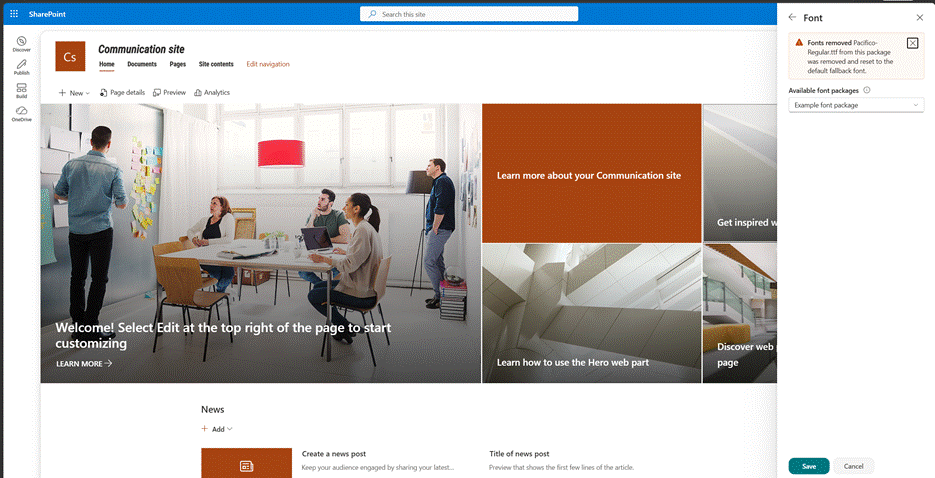
When a deleted font is referenced by existing SharePoint sites or pages, the content will continue to be rendered using a Microsoft-defined fallback font. Font packages that reference deleted fonts are not automatically deleted. They remain available for use, but a warning message is displayed when required fonts are unavailable.
Rollout schedule
General Availability (Worldwide): We will begin rolling out on late September 2026 and expect to complete by mid-October 2026.
Impact on your organization
Note: Brand font management in Brand Center currently depends on the SharePoint Public CDN and is available only to customers who have Public CDN enabled.
- SharePoint administrators can manage brand font deletion via PowerShell, helping organizations govern SharePoint brand fonts lifecycle, licensing, and compliance. The cmdlet removes font copies across the primary geo and satellite geos, helping avoid cross-geo inconsistencies.
- End-user content remains readable. If a deleted font is referenced by an existing site or page, SharePoint will use the Microsoft-defined fallback fonts.
- Font packages that reference deleted fonts remain available, with status shown to indicate unavailable font references.
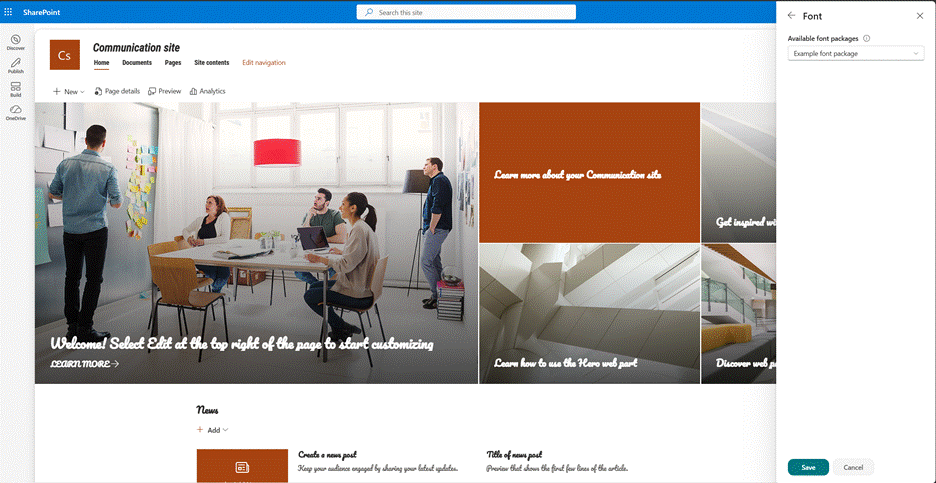
Example results of running the cmdlet

Before deleting the font
After deleting the font
Action required / Recommendations
- Review the official documentation for PowerShell branding governance:
- After rollout is complete, upgrade your PowerShell module to the required version before using these new features.
- Review the current fonts in the Brand Center and identify fonts that are no longer approved, licensed, or needed.
- Coordinate with brand managers and SharePoint site owners before deleting fonts that may affect site branding.
- Update internal documentation and admin procedures for managing brand fonts with PowerShell.