

Updated August 28, 2026: We have updated the timeline. Thank you for your patience.
[Introduction]
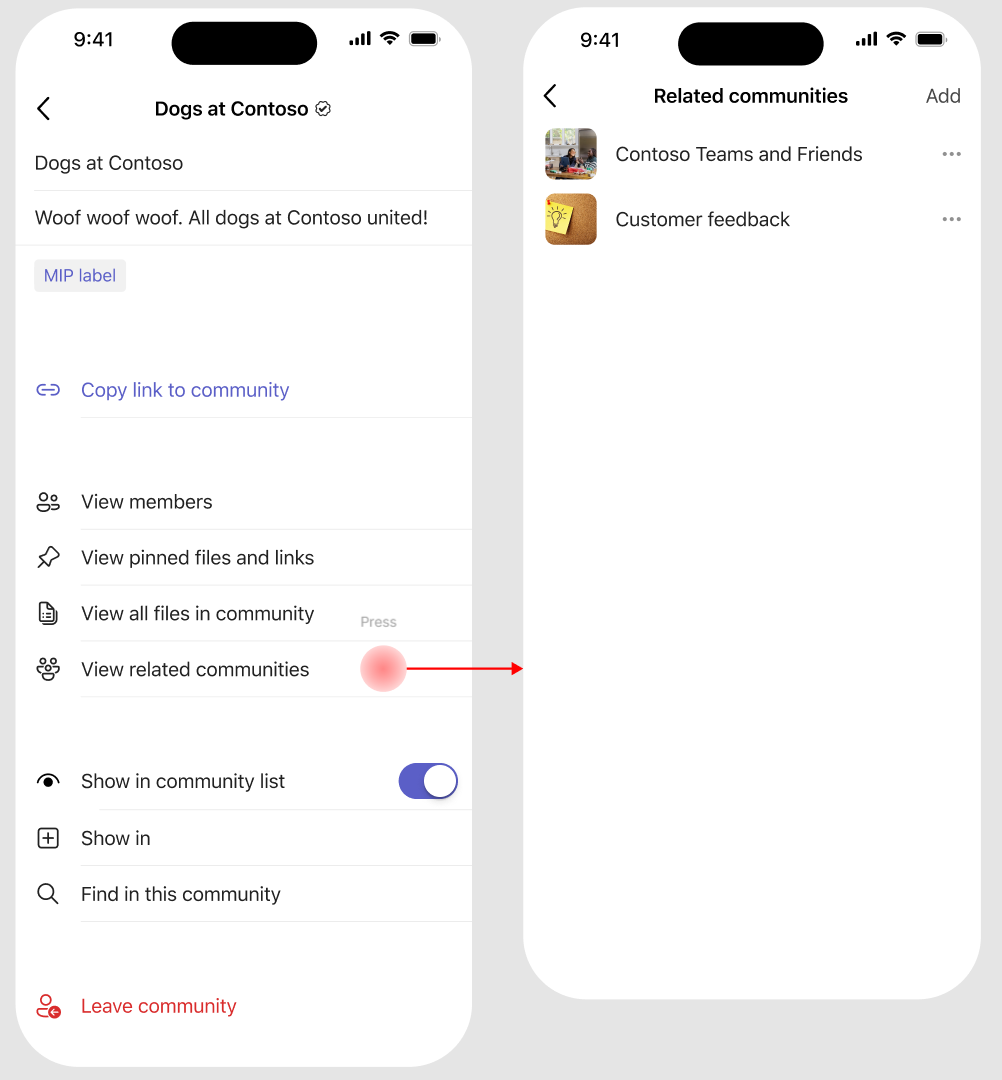
We're improving the Viva Engage experience in Microsoft Teams for iOS by bringing pinned resources and related communities into the Teams mobile app. Pinned resources highlight important links and files within a community, while related communities help users discover other relevant Viva Engage communities. These are two separate features that work together to improve information access and community discovery.
This update aligns the iOS experience with Engage on the web, the Engage mobile app, and Teams for Android, helping users discover important content and related communities more easily—especially those who rely on Teams on iOS as their primary communication tool.
This message is associated with Roadmap ID 559107.
[When this will happen:]
- General Availability (Worldwide): Rollout begins in mid-June 2026 (previously late May) and is expected to complete by end of September 2026 (previously mid-August).
[How this affects your organization:]
Who is affected:
- Users who access Viva Engage communities in Microsoft Teams on iOS
- Community admins who manage Viva Engage communities
What will happen:
- Users will see pinned resources for a community directly within Teams on iOS.
- Users will see related communities surfaced within the community experience.
- The experience will match what is already available in the Viva Engage mobile app, Viva Engage on the web, and Teams for Android.
- The feature is enabled by default.
- There are no changes to existing admin policies or configurations.
[What you can do to prepare:]
No admin action is required.
- Communicate this update to end users who use Teams on iOS.
- Encourage Viva Engage community admins to review pinned resources and related communities.
- Update internal documentation or helpdesk guidance, if applicable.
[Compliance considerations:]
No compliance considerations identified, review as appropriate for your organization.