

[What and why]
We're introducing the ability to view and manage auto attendant shared voicemails directly in the Microsoft Teams Queues app. Previously, organizations typically managed auto attendant voicemails through shared mailboxes or other workflows. This update provides a centralized experience for teams to review, triage, and respond to customer voicemail messages more efficiently.
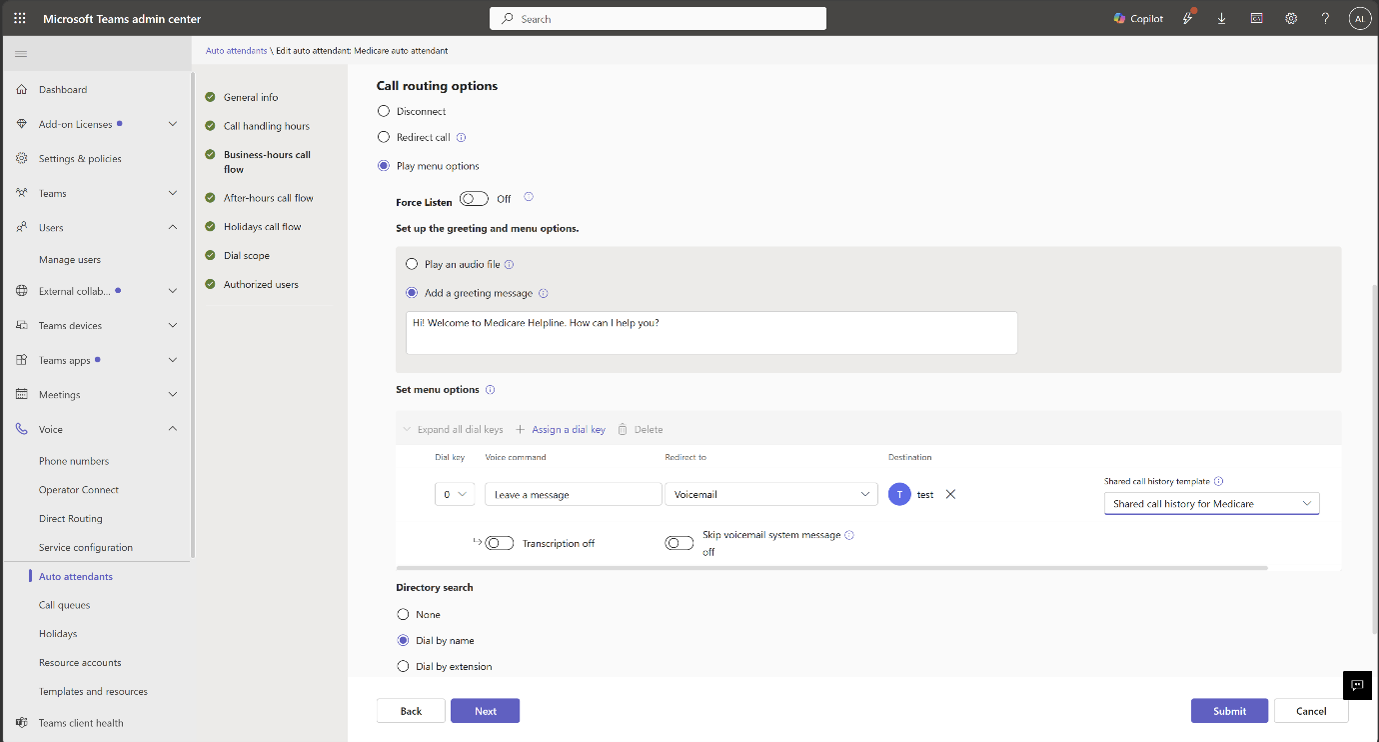
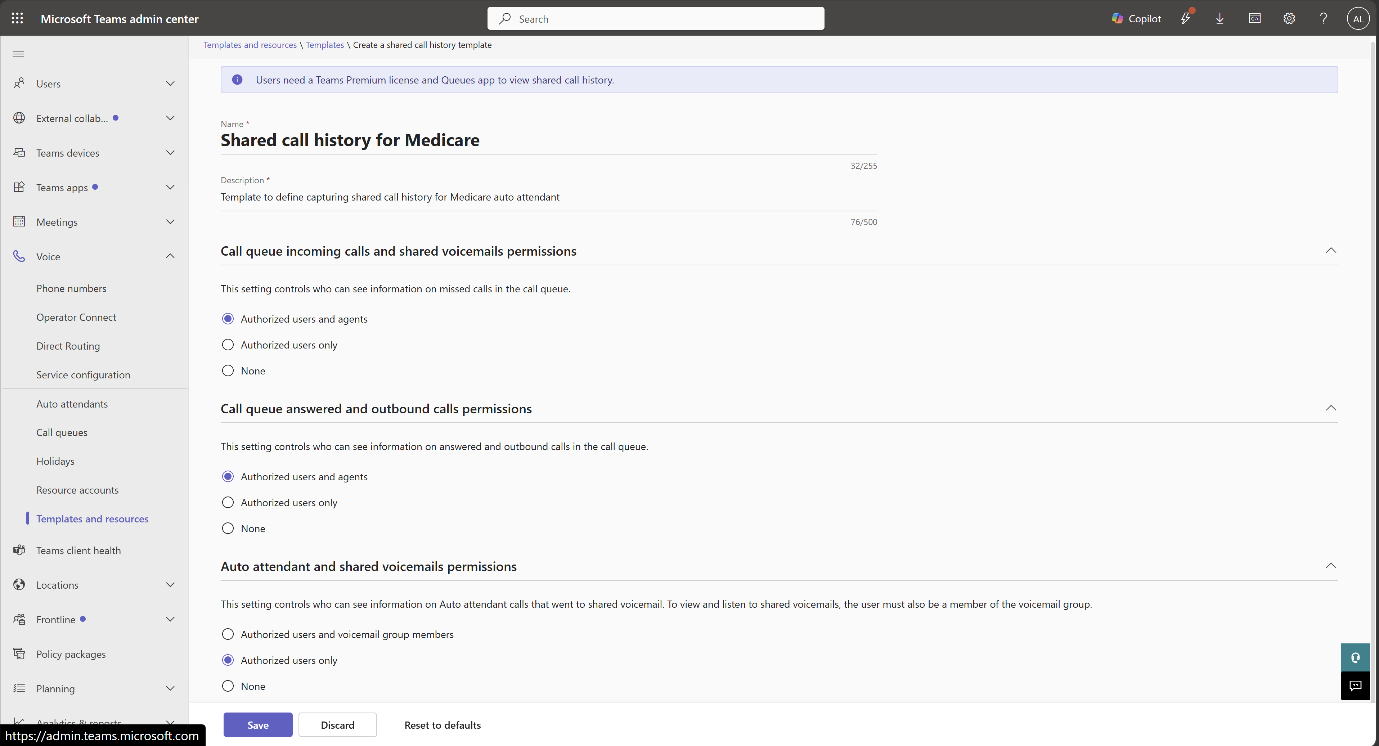
Administrators can control access to auto attendant voicemail history through permissions configured in the Teams admin center.
This message is associated with Microsoft 365 Roadmap ID 567457.
[Rollout schedule]
- Targeted Release: Beginning in mid-August 2026
- General Availability (Worldwide): Beginning in late August 2026
[Impact on your organization]
Who is affected
- Users licensed for Teams Premium who manage call queues or auto attendants
- Teams administrators responsible for configuring auto attendant permissions
- Organizations that use Microsoft Teams auto attendants with voicemail enabled
Platforms and services
- Microsoft Teams
- Teams Queues app
- Teams admin center
What will happen
After rollout:
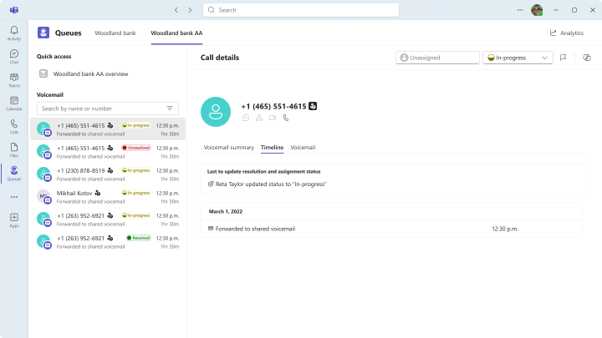
- Eligible users will see a new Auto Attendants tab in the Queues app.
- Users can view voicemail history for auto attendants they are authorized to access:
- Users can play voicemail messages and review transcripts when transcription is enabled.
- Users can track voicemail handling using the following statuses:
- Unresolved
- In Progress
- Resolved
- Users can filter voicemail messages by status.
- Users can mark voicemail messages as urgent to help prioritize follow-up activities.
Administrators can control access using one of the following permission models:
- Authorized users only: Only users explicitly assigned by an administrator can access voicemail history.
- Authorized users plus Microsoft 365 group members: Authorized users and members of the associated Microsoft 365 group can access voicemail history.
The feature is available only to eligible users who have the required Teams Premium licensing.
[Action required and recommendations]
Action may be required.
Review your current auto attendant voicemail management processes and determine which users require access to shared voicemail management in the Queues app.
We recommend that administrators:
- Review and configure auto attendant voicemail permissions in the Teams admin center.
- Verify that intended users have the appropriate Teams Premium licenses.
- Update internal support documentation and operational procedures.
- Notify affected users about the new voicemail management experience before rollout.
Learn more
- Plan - Shared Call History for Call Queue and Auto Attendant | Microsoft Teams | Microsoft Learn
- Setup - Shared Call History for Auto Attendant | Microsoft Teams | Microsoft Learn
[Compliance considerations]
| Question | Answer |
| Does this change alter how existing customer data is accessed? | Yes. Shared Auto Attendant voicemail data that previously was not available in the Queues app can now be viewed and managed directly within the Queues app by users who have been granted the appropriate permissions. |
| Does this change include an admin control? | Yes. Administrators control access to shared Auto Attendant voicemails through permission settings configured in the Teams admin center. Administrators can assign either Authorized Users only or Authorized Users plus Microsoft 365 group members. |
| Can the feature be controlled through Microsoft 365 group membership? | Yes. Administrators can grant access through membership in the Microsoft 365 group associated with the voicemail, in addition to explicitly authorized users. |
| Does this change alter how customer data is processed or presented? | Yes. Auto Attendant voicemails and any associated transcripts are surfaced in a new management experience within the Queues app, where users can view, filter, prioritize, and manage voicemail status. |