

Updated September 9, 2026: We have updated the timeline. Thank you for your patience.
[What and why]
We're updating the Microsoft Teams meeting lobby experience to improve privacy and align lobby visibility with existing meeting controls.
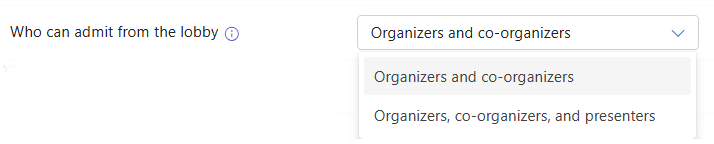
Today, the Who can admit from lobby option determines which meeting roles can admit people from the lobby, but it does not control who can see participants waiting in the lobby. As a result, some participants may be able to view the lobby even when they cannot admit attendees.
This change creates a more consistent and privacy-focused experience by aligning lobby visibility with lobby management permissions.
[Rollout schedule]
- General Availability (Worldwide, GCC): Beginning in early September 2026 and expected to complete by early October 2026 (previously mid-September)
[Impact on your organization]
Who is affected
- Microsoft Teams meeting organizers, co-organizers, presenters, and attendees
- Organizations that use the Who can admit from lobby option
Platforms and services
- Microsoft Teams desktop apps
- Microsoft Teams mobile apps
What will happen
- Lobby visibility will align with the Who can admit from lobby meeting option. Only users who are permitted to admit participants from the lobby will be able to see participants waiting in the lobby.
- For example, when Who can admit from lobby is set to Organizers and co-organizers only, presenters and attendees will no longer see participants waiting in the lobby. Only organizers and co-organizers will be able to view and manage lobby admissions.
- This change is enabled automatically and does not require configuration.
[Action required and recommendations]
No action is required.
We recommend informing meeting organizers about this change if they currently rely on presenters to monitor the lobby during meetings. Organizations should review any meeting workflows that depend on presenters having visibility into lobby participants.
[Compliance considerations]
No compliance considerations identified, review as appropriate for your organization.